


Integrating ServiceTitan with HubSpot: How Goettl Turned Lost Calls into Revenue
A robust lead generation system built on HubSpot and integrated with ServiceTitan
Goettl Air Conditioning & Plumbing is a privately held residential field services company that focuses on maintenance, repair, and replacement services, primarily in the U.S. Southwest. It operates under the long‑established Goettl brand, which dates back to 1939 and is now headquartered in Las Vegas, Nevada.
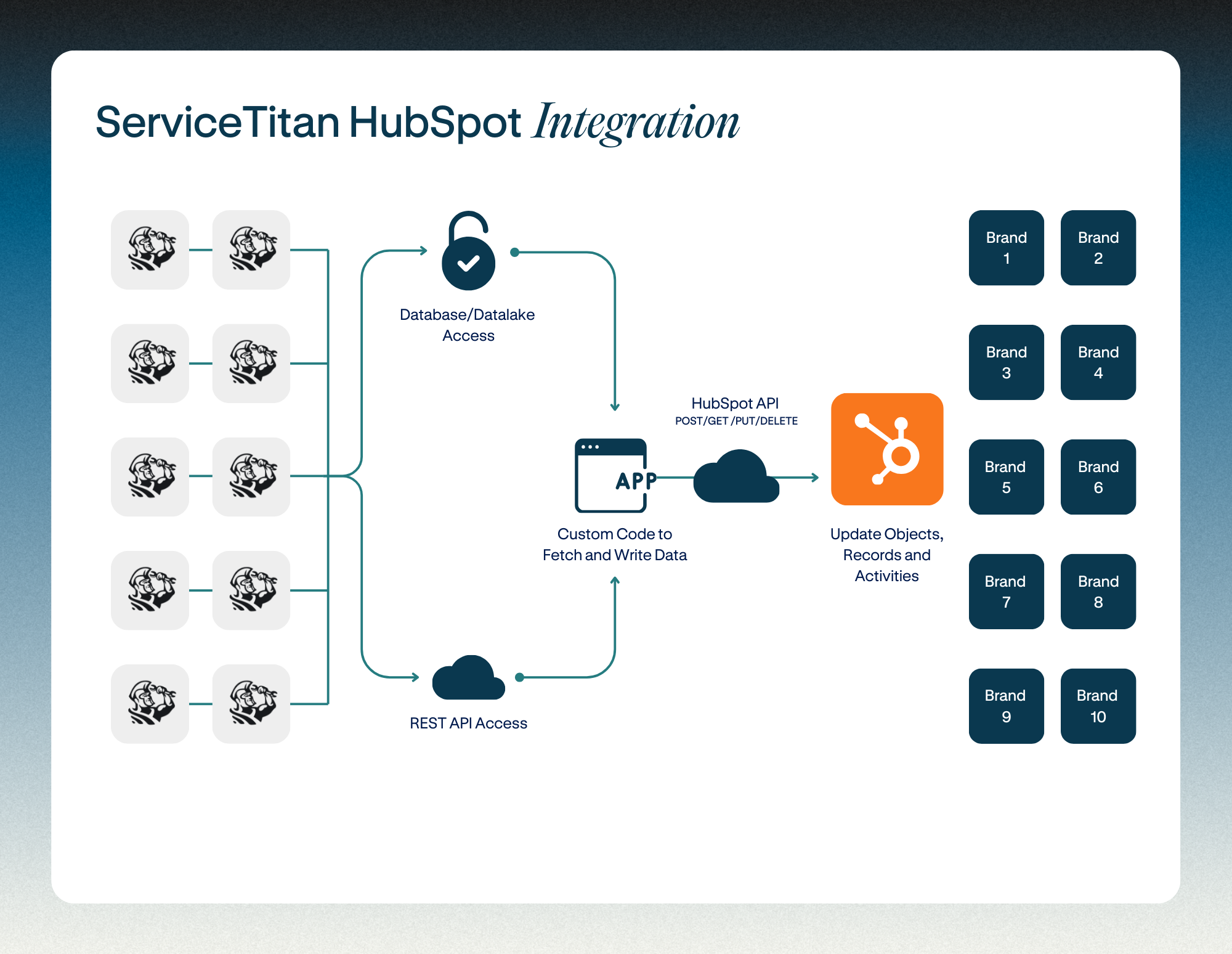
With operations out of 10 primary branch locations (hubs) across four states in the Southwestern United States, with a massive fleet of over 500 service trucks that cover hundreds of surrounding municipalities.
Goettl partnered with Instrumental to implement HubSpot Marketing Enterprise and a custom, multi‑location integration with ServiceTitan, transforming how they capture and convert leads.
Before this project, leads that called but didn’t book were effectively lost; now, HubSpot manages all pre‑booking activity and syncs customers, contacts, and jobs bi‑directionally with ServiceTitan, providing end‑to‑end visibility from first touch through to completed work.
Lost Opportunities Needed to be Captured
Goettl used ServiceTitan to manage field services for estimates, scheduling, dispatch, and custom management. The organization had stood up individual tenants of ServiceTitan for each of its ten locations. As marketing leadership sought to improve marketing efforts, they had one very large challenge. How could they effeciency and effectively map data in and from each of the ServiceTitan tenants?
Adding HubSpot was the strategy, but would they need ten different HubSpot tenants? Would they require ten separate, dedicated integrations? Or, was there a more creative and streamlined approach?
They needed to:
- Stand up HubSpot as the marketing engine for all pre-booking activity.
- Train a largely new marketing team on HubSpot best practices.
- Build a two-way, near-real-time sync between ServiceTitan and HubSpot across 10+ branches.
- Provide lead capture, tracking, and lifecycle visibility in HubSpot.
ServiceTitan API Extensibility
When attempting to integrate ServiceTitan with a third-party software solution such as HubSpot, it's important to understand the steps you'll need to take to set up a proper environment.
Step 1
You'll need your ServiceTitan Admin to Request Integration Environment Access. As a ServiceTitan customer, you'll need to ask your administrator to send an email to integrations@servicetitan.com asking for an instance of the integration environment, along with their Customer Verification PIN. Once validated, we will respond within two business days with the new integration environment instance details.
Step 2
The integrator (Instrumental's role in this project) will then leverage the provided access credentials to build an application in the developer portal.
-
Add Tenant IDs
You should add tenant IDs of the customers (a.k.a tenants) that you want to make your app visible. You can add/delete tenant IDs anytime. Every ServiceTitan customer will have at-least one tenant ID. If you do not know your tenant ID, please reach out to your ST admin with your organization.
-
API scopes
Choose the list of API scopes that your application uses. Your app can use View or Modify or View and Modify as options. The scopes that you have selected will be displayed to the app subscriber also known as a resource owner who can be the ServiceTitan admin of your organization. This admin after viewing the app details and API scopes, can generate and share the Client ID and Secret Key with your app.
-
App key
After completing the steps to add a new app, your application key will be generated. ServiceTitan identifies your application by the app key. You need to embed the application key into your app and pass it along with an access token to make a successful API call.
Step 3
With the developer app now set up successfully, that provides the integrator the ability to customize the integration to meet the specifications of the client. The integrator will leverage the provided APIs to map a host of indepth endpoints for one-directional and bi-directional syncs. Here's a short list of the available objects:
- Accounting
- Crm
- Customer Interactions
- Dispatch
- Equipment Services
- Forms
- Inventory
- Job Booking
- Job Planning & Management
- Marketing
- Marketing Ads
- Marketing Reputation
- Memberships
- Payroll
- Pricebook
- Reporting
- Sales & Estimates
- Scheduling Pro
- Service Agreements
- Settings
- Task Management
- Telecom
- Timesheets
Complete system design, integration, and onboarding into HubSpot.
The implementation project was set to be completed over a three-phase timeline and both teams would share execution responsibilities:
- Phase 1: HubSpot Onboarding
- Phase 2: HubSpot <> ServiceTitan Integration
- Phase 3: Integration Continuity
HubSpot Marketing Enterprise Onboarding
Instrumental Group introduced a dedicated specialist for HubSpot Onboarding to help Goettl activate its new HubSpot license quickly. The HubSpot Success Manager (HSM) ensured they had a well-rounded and complete understanding of the entire HubSpot Suite so Goettl could build quickly, and with confidence. The HSM set forth to complete the following steps.
- Kickoff and Goal Setting: We begin all onboarding projects with a dedicated kickoff call. The call covered introductions, the roles and responsibilities of each stakeholder, the project's priorities, and areas of focus for subsequent training calls.
- Global License Configuration:We offer to pick up all the initial settings and global configurations on new HubSpot licenses. We started with a workbook to ensure we had the proper branding elements, then jumped in to set up the Marketing Enterprise features to ensure their instance was ready for customization.
- Primary license brand elements
- Custom contact & company fields
- Website integration to pull all web consumption into HubSpot
- Template Setup & Styling: One of the big value-adds we offer new Marketing license owners is build-ready templates for landing pages and emails. Themes were imported and style to meet Goettl's trusted brand identity.
- Project-long User Support:Our HSM also reviewed early progress, offered advice and direction, and set up their first training call. A master training dashboard was built in HubSpot to house helpful resources and training recordings. This one-stop shop was developed to ensure the marketing team had everything they needed to develop marketing journeys in HubSpot.
- Role-based Team Training: Instrumental also delivered role‑based HubSpot training and documentation, driving adoption across Goettl’s marketing and sales teams and laying a strong foundation for future enhancements like integrated chat and richer service reporting.
Integrating ServiceTitan with HubSpot
Does ServiceTitan integrate with HubSpot?
The process of meeting with key stakeholders to design the ideal state for their complex technology stack would ensure critical functions were met and data moved successfully between HubSpot and ServiceTitan. We collaborated with our API integration partners at Integrate IQ and the Goettl technical team to identify sync requirements, including fields across the contact, company, and deal objects. The bi-directional integration would be built once, to a standardized application. Once built, the integration will be replicated for 9 additional locations.
This strategy required that a standardized data set would be used across every instance, providing the efficiency necessary to avoid multiple, costly dedicated integrations between each ServiceTitan tenant and HubSpot.
- Step 1: Process Mapping
As we started this project element, we mapped the flow of field service data to meet marketing objectives. Marketing's primary use case would be data-powered marketing automation to improve lead intelligence while the sales and service team would require efficient, dynamic data sync for new records to sync from HubSpot into ServiceTitan when status triggers were met. - Step 2: Field Mapping
Once we understood the data points Goettl wanted to work with, we mapped each endpoint (field record) necessary to personalize communications and inform sales. This mapping accounted for different types of customers originating or routing to different locations. - Step 3: Field Configuration
Proper mapping makes field configuration a breeze. Another value Instrumental added was the experience of integrating with multiple core banking platforms. We have developed a recipe book with common configuration requirements. Having implemented the record enhancement during mapping, the delta field set came together quickly and painlessly.- HubSpot to ServiceTitan custom fields: Services Interested In, Angi Match Type, Lead ID, Lead Cost, Branch, Lead Source, Campaign
- ServiceTitan to HubSpot custom fields: Angi Match Type, Lead Source, Campaign, Membership (including 5 addition sub-fields, Customer Since
- Over 30 standard fields were also mapped, by object, between systems for the sync
- Step 4: Application Development
Our partners at Integrate IQ performed the application development and API work. With a clear vision of which endpoints needed to be mapped to destination fields between software solutions. The team architected the integration via API, writing rules for object sync according to the specifications.- Objects to sync: Company records, Deal Records, and Contact Records
- Contact Records would need to include maps to Location, Job, and Customer data
- Objects to sync: Company records, Deal Records, and Contact Records
- Step 5: Validation and Testing
Our teams collaborated with Goettl's technical team and support personnel at ServiceTitan to ensure that data was accurately reflected in within both systems. Final validation demonstrated an active, real-time data sync and operational achievement.
Integration Continuity
-
Integration maintenance and stability
-
API issues
-
System Issues
-
Credential Expiration
-
Human errors and changes
-
-
Optimization and enhancements
-
Ongoing field and property updates
-
Ongoing changes to sync rules
-
-
Data: Reporting and analytics
-
Error reporting, activity reporting available upon request
-
-
Access to our team
-
Chat, email, Zoom and tickets
-
On-demand meetings with members of the Goettl team, including IT and vendors
-
-
Connection to resources
-
Knowledge share and suggestions to help solve problems
-
Successful Integration and Adoption
With HubSpot fully adopted and tightly integrated with ServiceTitan, Goettl now has a unified, scalable revenue engine that connects marketing, sales, and operations.
Additional support was provided by streamlining and de‑duplicating customer data across HubSpot and ServiceTitan, enabling accurate revenue attribution and cleaner finance workflows. Automated lead routing, status management, and follow‑up workflows replaced manual spreadsheets, significantly improving speed and consistency.
Leads are no longer lost, data is cleaner and more reliable, and attribution from campaign to booked job is finally visible. Manual spreadsheets and ad hoc processes have been replaced with automated routing, workflows, and role‑based dashboards that keep teams aligned and accountable.
Just as importantly, Goettl’s marketing and sales teams are enabled and confident in the tools they use every day, and the organization now has a solid foundation to continue innovating with chat, service, and reputation management in future phases.