





For years, Learn LMS customers running on HubSpot faced a limitation. We could capture learner data. We could report on it in-app. But when it came time to really connect the dots between training and revenue or between learning and retention, things got complicated.
Why? Because until now, the only way to store a custom set of data at the object level in HubSpot was to buy an Enterprise license. Expensive. Heavy. Overkill for many teams. And as app partners, we didn’t want to build Learn LMS in a way that only worked for customers on the highest and priciest HubSpot tiers. Our goal has always been to keep the barrier to entry low, so more teams could get value from training inside HubSpot. But that came with tradeoffs. Until now.
That’s all changed.
With HubSpot’s new App Objects functionality, Learn LMS can now create dedicated object types—purpose-built for your training programs—directly in your HubSpot account. No Enterprise license required. No hacks. Just clean, native objects you can use across the CRM.
Meet Your New Objects
Inside HubSpot, you’ll now see a new dropdown in your Object Index pages. Under the familiar Contacts, Companies, and Deals, you’ll find a fresh set of entries:
-
Learn LMS Courses – Every course in your Learn LMS instance, structured as its own object.
-
Learn LMS Enrollments – Each learner’s enrollment in a course, with progress and engagement data tied to the record.
-
Learn LMS Badges – Not fully activated yet, but already visible in the UI. These will track badges earned by learners.
-
Learn LMS Certifications – Certifications awarded, captured as full-fledged objects that can be reported on and automated against.
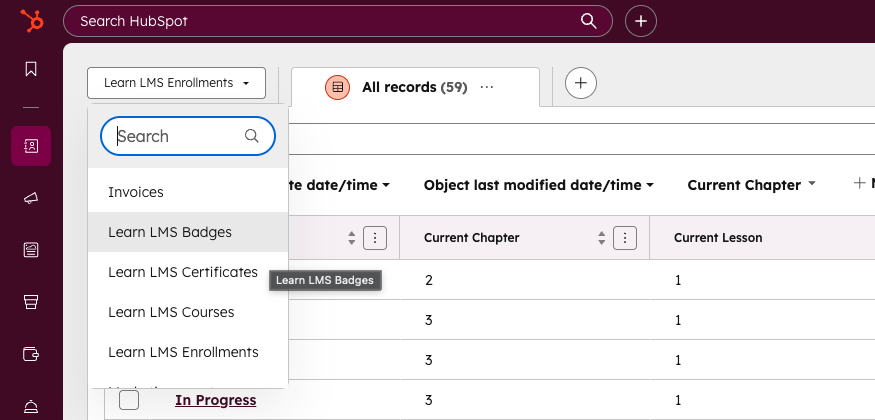
For admins, this means your learning data lives right alongside your sales and service data: native, queryable, and actionable.
Why This Matters
It’s one thing to have data in a learning platform. It’s another to activate it inside HubSpot. With App Objects powering Learn LMS, you can:
1. Build Cross-Object Reports That Actually Tell a Story
Before this release, we gave you a few pre-built reports: a global view and an individual progress report. Useful, but static. Buried. Not customizable.
Now, your team can use HubSpot’s native reporting tools to build whatever matters most to you:
-
Tie learner engagement directly to pipeline contribution. See if trained accounts close faster.
-
Track outcomes by cohort or account. Compare training impact across different customer segments.
-
Drop LMS data into HubSpot dashboards. Layer it with sales, support, or marketing data for a holistic view.
And with Data Hub integrations rolling out, you can push even further—combining LMS objects with external datasets for advanced analysis.
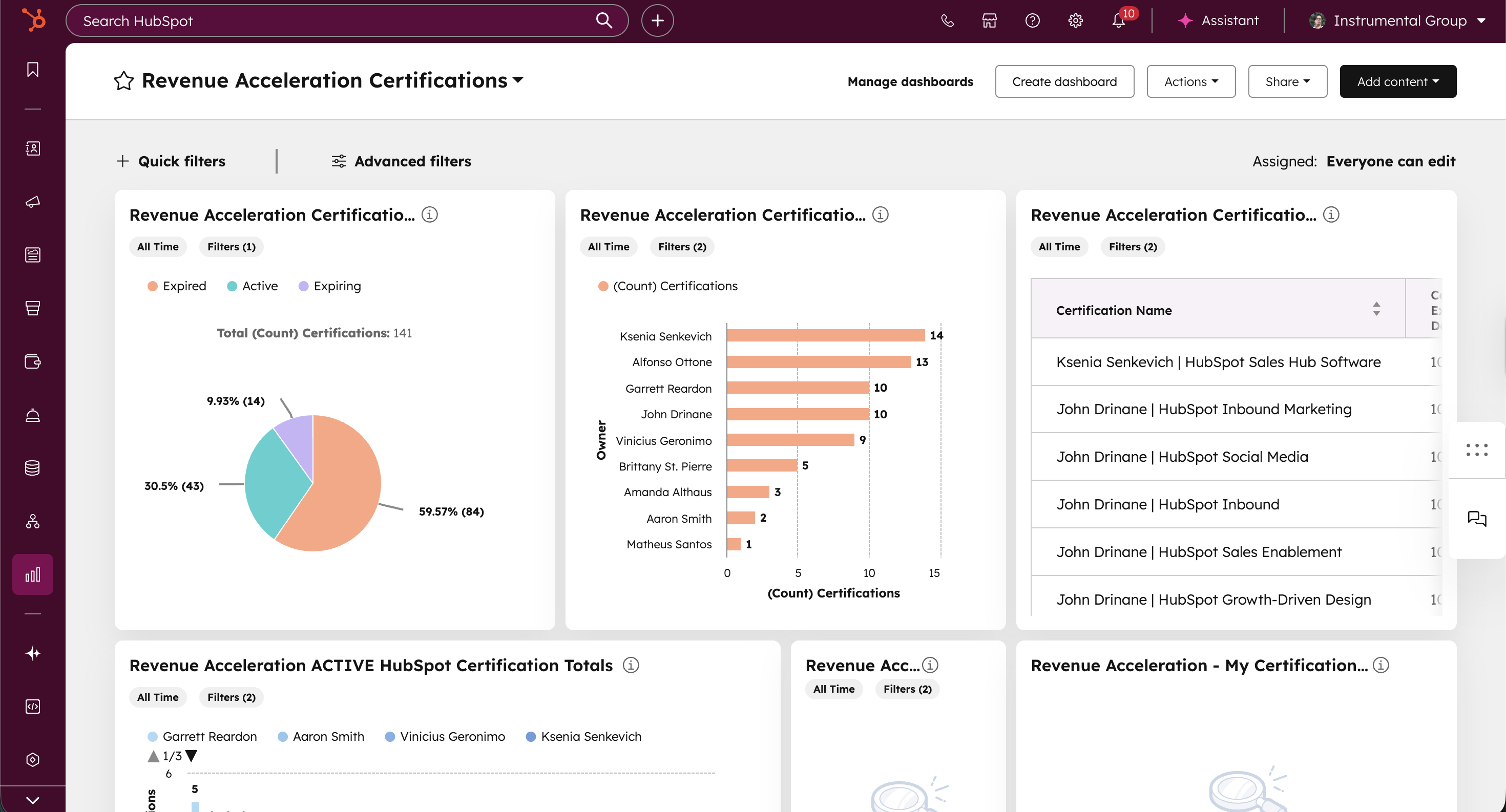
2. Filter, Slice, and Segment Like Never Before
Every object comes with its own index page. Which means you can filter, sort, and segment right in HubSpot. Want to see all learners who started a course but didn’t finish? Or filter certifications by issue date? Or build a list of accounts with zero certified users? Easy.
From there, segmentation becomes powerful:
-
Build dynamic lists that use Learn LMS objects as criteria.
-
Feed those lists into campaigns, nurtures, or sales outreach.
-
Trigger workflows that respond to learning milestones.
3. Workflows That Drive Action
Objects aren’t just about storage—they’re about automation. Every Learn LMS object can now be pulled into HubSpot workflows.
Examples:
-
Send a personalized nudge email when a learner stalls in a course.
-
Alert a CSM when a certification is earned at a key account.
-
Enroll learners in upsell campaigns once they complete a training path.
This is where the learning data moves from passive to active. No more exporting CSVs. No more manual syncs. Just automated, scalable action.
The Road Ahead: Goodbye HubDB
One last thing. Historically, Learn LMS relied on HubDB to power course pages. It worked. But it was clunky. Limited.
With App Objects, we’re preparing to fully deprecate HubDB and connect all course pages directly to the new Course Objects. That means cleaner data. Less duplication. And far more flexibility for customization.
It’s the foundation for a system that’s not only easier to manage, but also far more powerful to scale.
Why It’s Cool (And Not Just “Nice to Have”)
Let’s zoom out.
Training isn’t just about completion rates. It’s about impact. On adoption. On retention. On revenue.
By embedding Learn LMS data directly into HubSpot as first-class objects, you unlock a direct line between learning outcomes and business outcomes. You can show the pipeline influence of a training program. You can prove that certified users churn less. You can demonstrate that trained champions accelerate deals.
This isn’t vanity reporting. It’s strategic.
And it’s something that, until now, required workarounds, exports, or expensive licenses.
Final Word
The new version of Learn LMS, powered by HubSpot App Objects, transforms training data from something siloed to something strategic.
Your courses, enrollments, certifications, and badges are no longer trapped inside a learning app. They’re living, breathing objects inside the CRM you already use every day.
This is more than an integration update. It’s a shift in how companies connect education to growth.
And it’s just the beginning.