





Short answer
Start by determining the actionable use case for specific data, which is generally relevant by role. HubSpot should own lead data and lifecycle stage. ServiceTitan owns customer data, job status, quotes, jobs, service calls and revenue. Most teams fail to tie the necessary data between systems, which is where attribution breaks.
Start with the use case for the data
When a field service company asks me what they should sync, the first thing I tell them is to determine the actionable use case for specific data. That use case is generally relevant by role. Marketing requires a different data set than sales.
Your integration options
ServiceTitan's current documentation lists HubSpot Marketing Services among the integrations it no longer supports. In our November 2026 review, we did not find a native ServiceTitan integration listed in the HubSpot App Marketplace. That leaves four ways to connect the two systems:
- A custom API integration
- A third-party automation tool such as Zapier
- Custom middleware hosted on a platform such as Railway
- HubSpot Data Hub Professional or Enterprise, using the Send a webhook and Custom code workflow actions described in HubSpot's workflow action documentation
Given the complexity of the data set and the nuances of each organization, we recommend the custom API route.
Which system should own what
HubSpot should own lead data, and ServiceTitan owns customer data. Lifecycle stage lives in HubSpot, and job status lives in ServiceTitan. Use HubSpot as your marketing and sales engine, and use ServiceTitan for quotes, jobs, service calls, and revenue.
|
What syncs |
Which direction |
Which system owns it |
|---|---|---|
|
Lead data: lead source, campaign, lead ID, lead cost, branch, services interested in (Goettl case study) |
HubSpot to ServiceTitan. Lead source and campaign also flow back to HubSpot in Goettl's case. |
HubSpot |
|
Lifecycle stage |
Stays in HubSpot |
HubSpot |
|
Customers and contacts, with HubSpot contacts mapped to ServiceTitan customers and locations (Goettl case study) |
Both directions |
ServiceTitan |
|
Jobs, most often as HubSpot deals (Ultimate Heating & Cooling case study) |
ServiceTitan to HubSpot. Goettl's case study describes customer, contact, and job sync in both directions. |
ServiceTitan |
|
Job status, mapped to HubSpot deal stages (Ultimate Heating & Cooling case study) |
ServiceTitan to HubSpot, when the workflow calls for an update, such as job completion |
ServiceTitan |
|
Membership and customer since (Goettl case study) |
ServiceTitan to HubSpot |
ServiceTitan |
|
Job revenue, tied back to lead source (Ultimate Heating & Cooling case study) |
ServiceTitan to HubSpot |
ServiceTitan |
These are the other data points we see customers ask about syncing, all available through ServiceTitan's API:
- Accounting
- Customer Interactions
- Dispatch
- Equipment Services
- Forms
- Inventory
- Job Planning & Management
- Memberships
- Payroll
- Pricebook
- Sales & Estimates
- Scheduling Pro
- Service Agreements
- Task Management
- Timesheets
ServiceTitan sets API access per tenant and app scope, so confirm what your own setup exposes before you plan around it. See the current ServiceTitan API documentation for the access model.
Should ServiceTitan jobs become HubSpot deals or custom objects?
Either route can work, a deal or a custom object, but deals are the most common landing spot for ServiceTitan jobs. Syncing jobs to HubSpot deals gives your team a clean, easy way to manage and view multiple deals through their associations with contacts and companies. When each deal carries accurate job revenue, it also opens up attribution reporting.
Keep records clean across locations and tenants
HubSpot can recognize and merge duplicate records based on unique identifiers. It automatically deduplicates contacts by email address and companies by domain name. Companies created through the API are not deduplicated by domain, so store the ServiceTitan ID in a HubSpot property that requires unique values.
Instrumental's Goettl Air Conditioning & Plumbing case study also reports deduplication as part of the integration.
Single-tenant vs. multi-tenant syncs
How you build the sync depends on one distinction: are you connecting a single ServiceTitan tenant or several? For a multi-tenant account sync like Goettl's, you have to get the plumbing set up so data routes correctly to and from multiple ServiceTitan instances and a single HubSpot instance.
Goettl runs ten branch locations in four states, with one separate ServiceTitan tenant for each location. The bidirectional integration was built once as a standardized application, then replicated for nine more locations. Using a standardized data set across every instance avoided ten separate, costly integrations. Each tenant still has to be maintained separately, so the continuity plan covers API issues, credential expiration, and sync rule changes.
The Goettl case study details this data routing and includes a diagram of how it works.
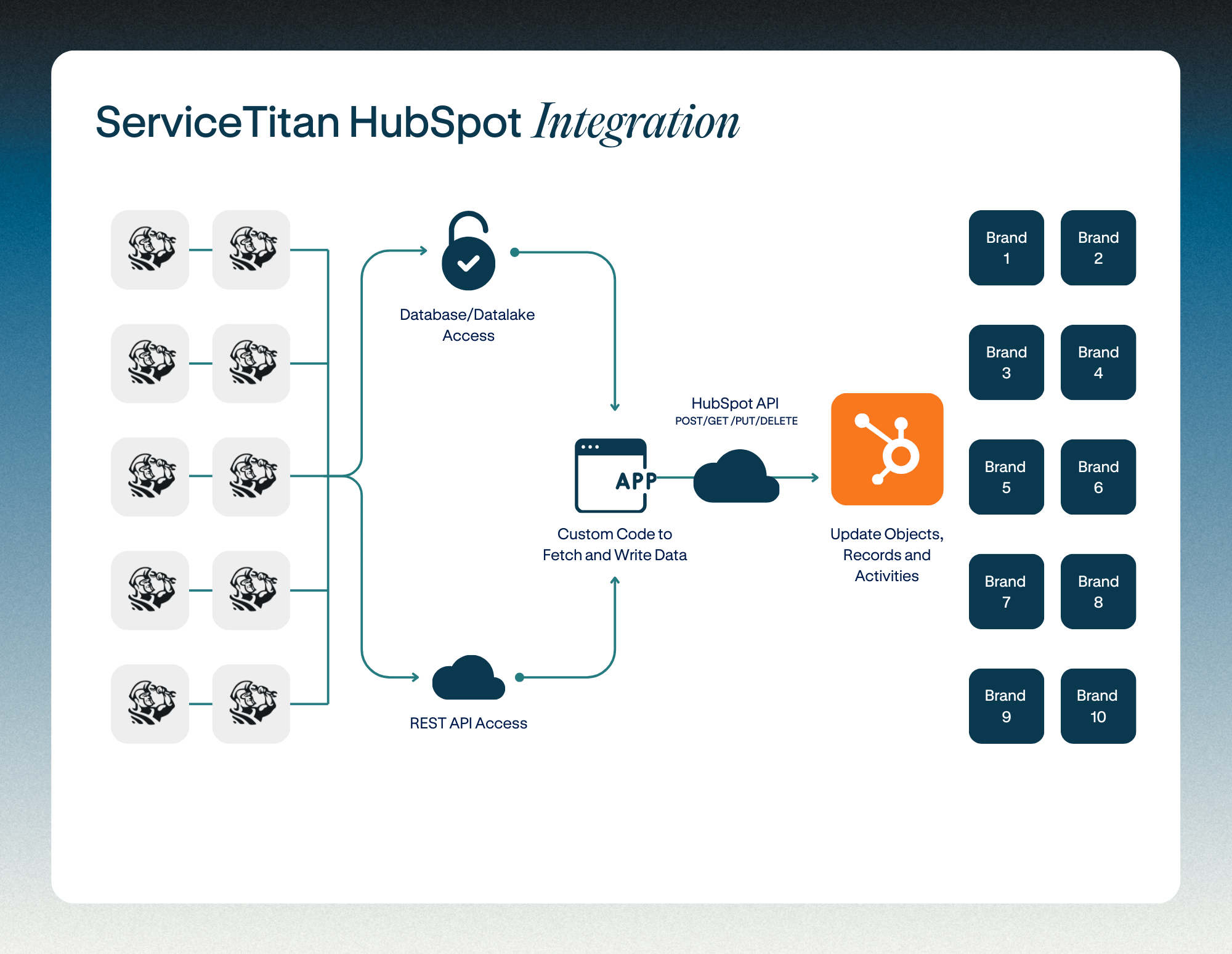 This diagram details an intelligent multi-tenant integration architecture
Tie job revenue back to the lead source
Most teams fail to tie the necessary data between systems, which is where attribution breaks.
At Ultimate Heating & Cooling, a Denver HVAC company, ServiceTitan held the revenue data and HubSpot held the contact source data. Instrumental's case study reports that connecting the two through the API produced a 725% increase in attributed booked revenue in four months.
The ability to tie revenue to marketing action provided attributable value to the marketing team and its efforts. It changed the way the organization viewed the relationship.
Use lifecycle stage as the sync trigger
Managing the contact lifecycle in HubSpot gives you clear sync triggers based on each contact's status and prevents premature syncing of leads into ServiceTitan. Records move over when they truly belong in your job management platform. When a lifecycle stage changes, a HubSpot contact-based workflow can send a POST webhook to an outside system to start the sync. The Send a webhook workflow action requires Data Hub Professional or Enterprise.
Does every field need to sync in real time?
No, sync triggers can be set for different periods. Something like job status can be synced into HubSpot when the job is complete instead of while it is in process.
Zapier or a custom API integration?
Zapier's HubSpot and ServiceTitan page lists workflows such as creating or updating HubSpot contacts from ServiceTitan customers and creating ServiceTitan bookings from HubSpot form submissions. The page's examples do not address the multi-tenant, field-level model in this article.
Zapier is a good fit for lightweight automation, but we would not choose it as the backbone for a business-critical HubSpot-ServiceTitan integration with complex record relationships or bidirectional updates.
"The concern is not whether it can connect the systems. It is whether we can reliably control identity matching, prevent duplicate or conflicting updates, handle API limits and partial failures, reconcile missed changes, and maintain the logic as the process evolves. A custom integration lets us design and test those controls explicitly. It also means we take responsibility for building and operating them."
|
Decision factor |
Zapier fits |
Custom API fits |
|---|---|---|
|
Workflow |
One event, a few predictable actions |
Related records, branching rules, two-way sync |
|
Data integrity |
A missed or repeated update is recoverable by hand |
Duplicates, partial updates, or stale records matter |
|
Volume |
Low, steady activity |
Bursts, backfills, or tightly managed API usage |
|
Operations |
A simple workflow is easy to inspect |
You need explicit monitoring, testing, and recovery |
The custom API integration in the Goettl story connects HubSpot to all ten Goettl ServiceTitan tenants, syncing customers, contacts, and jobs in both directions with more than 30 standard fields mapped, according to the case study.
How we test a CRM integration before go-live
Once the integration is configured, our team tests it against the functional requirements established during design. That covers:
- Testing and quality assurance
- Adjustments and troubleshooting
- A live demo of the integration
- User acceptance training
User acceptance testing (UAT) is the final validation step. It checks that the HubSpot environment performs as designed, supports the intended business workflows, and is ready for go-live. We run a structured UAT process with defined procedures, roles, and communication channels for testing and issue management. Testing follows a documented plan with clear acceptance criteria, prioritized workflows, and a shared issue-tracking system for transparency throughout the cycle. During this step, functional testing focuses on verifying that the items included in the implementation operate as intended.
What UAT produces
- A documented UAT plan
- An issue log with resolution details
- Formal sign-off confirming that the system meets functional expectations and is ready for deployment
Planning your ServiceTitan HubSpot integration
If you're mapping out a ServiceTitan HubSpot integration, our HubSpot consulting and integration services page explains how we approach system design and API integrations. You can click the image at the bottom to schedule time to discuss!
Sources
- Instrumental, Goettl Air Conditioning & Plumbing: ServiceTitan and HubSpot integration
- Instrumental, Ultimate Heating & Cooling: HubSpot and ServiceTitan integration
- ServiceTitan, Available ServiceTitan integrations
- ServiceTitan, Get started with API Dev Portal V2
- ServiceTitan Developer Portal, Create an app
- HubSpot Developers, Using object APIs
- HubSpot Knowledge Base, Deduplicate records in HubSpot
- HubSpot Knowledge Base, Trigger webhooks in HubSpot contact-based workflows
- HubSpot Knowledge Base, Choose your workflow actions
- Railway, Railway cloud platform
- Zapier, HubSpot and ServiceTitan integrations